Reports
The report archive — every saved report per project and portfolio, print-ready. Pro feature.
The Reports page is the archive: every report you've saved, per project and portfolio, as a table — assistant answers you kept and report-page snapshots, durable and printable. The day-to-day numbers live on the Dashboard; Reports is where documents come from and where they're kept.
The archive
- Everything in one table — title, type (assistant answer or report snapshot), scope (portfolio or the product it's about), and when it was saved. Click through to read, print, rename, or delete.
- New portfolio report generates the live investor document from
current data — one click from the archive, at
/reports/portfolio. - Product reports are generated on each product's Report tab (see the dossier below) and saved into the same archive.
Portfolio report
The live portfolio report (at /reports/portfolio) turns your portfolio
into numbers you can show another person — an investor, a partner, or the
honest version of yourself at 11pm:
- Totals — portfolio MRR, paying customers, ARPU, and a founder-adjusted net: MRR minus infrastructure minus founder hours, valued at each product's founder hour rate — a per-product setting (Product → Settings, default $100/h). The adjusted net exists because a "profitable" product eating 60 hours a month at your real rate isn't one.
- MRR trend — the last 60 days, recorded from Live Data Feed deliveries, with a dashed breakeven line at the current run-rate needed to net zero (infrastructure + founder time). MRR is not profit until the area crosses that line — the gap between them is the honest picture of what growth still isn't paying you. It is current-state context only: historical net is never back-computed from today's settings. Products without a feed appear in the economics table at their current numbers, but no history is invented.
- Concentration & sellability — how much of your MRR rides on your biggest product (investors read >50% as "this portfolio is really one asset"), plus how many products are scored, earning, and decided.
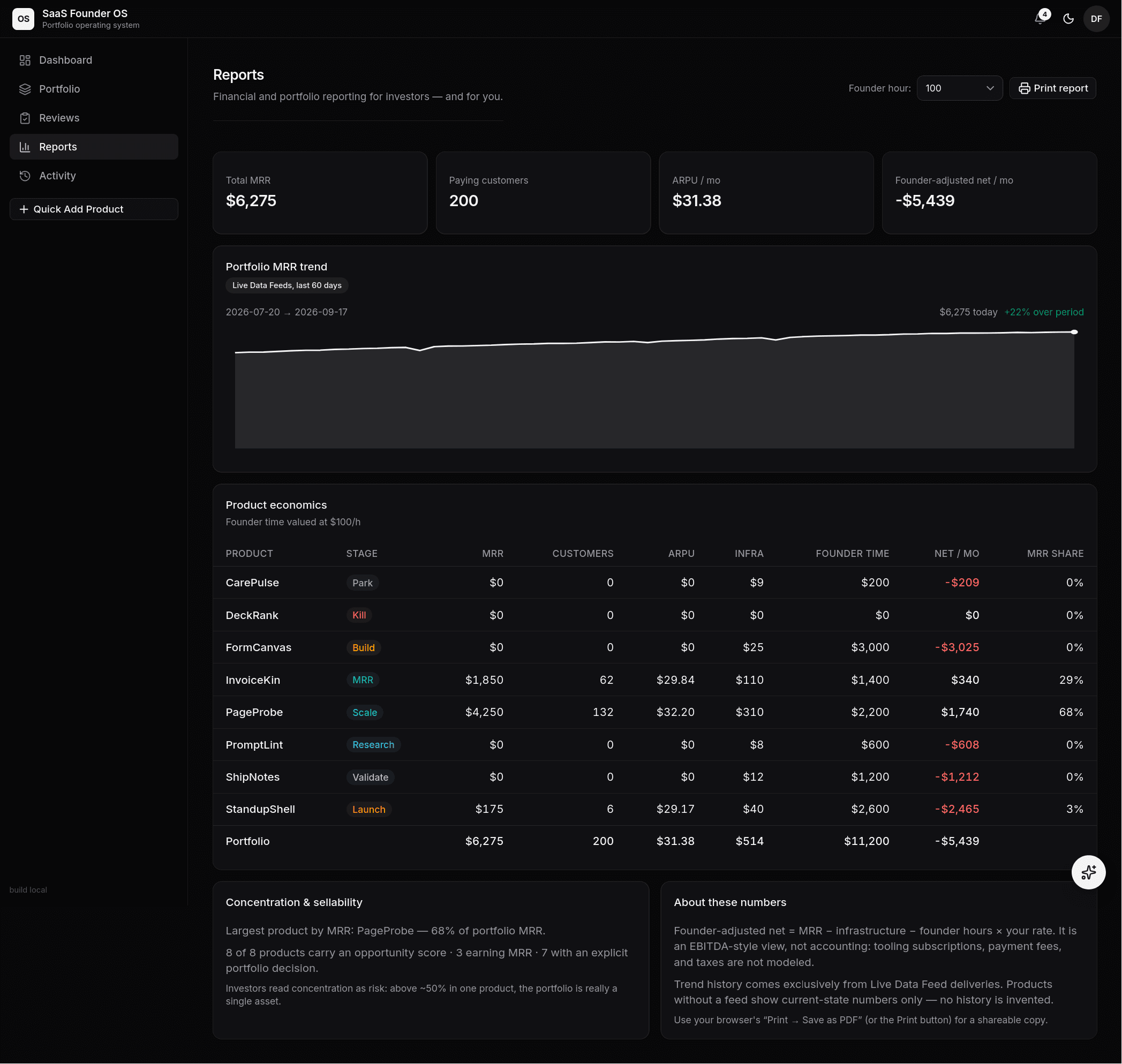 The portfolio report generator: totals with founder-adjusted net, the
60-day MRR trend from feed deliveries, per-product economics with founder
time valued at each product's rate, and the concentration read — PageProbe
at 68% is the "really one asset" flag.
The portfolio report generator: totals with founder-adjusted net, the
60-day MRR trend from feed deliveries, per-product economics with founder
time valued at each product's rate, and the concentration read — PageProbe
at 68% is the "really one asset" flag.
Product reports — the product dossier
Each product's Report tab is "the whole product on one page." The numbers come first — KPIs, the MRR trend for that product (with the same dashed breakeven line as the portfolio view: where this product's MRR has to reach before it pays you), founder-adjusted economics, the opportunity score, and gate status — and below them the operating evidence behind the numbers:
- Experiments — each with status, the result against its metric and target, and the learning + decision. Planned experiments show their target, never an invented result.
- Risks — open before closed, loudest first; an unmitigated HIGH risk is flagged in place.
- Decisions — the current portfolio verdict plus the decision log: every recorded stage change and verdict with its rationale and evidence.
- Connections — the stack behind the product by name, category, purpose, and status. No URLs, no account identifiers, no credential pointers — records never contain secrets, and a printable page shares only roles.
Sections with nothing recorded say so plainly — an empty section is pitch-prep signal, and nothing is invented to fill a page.
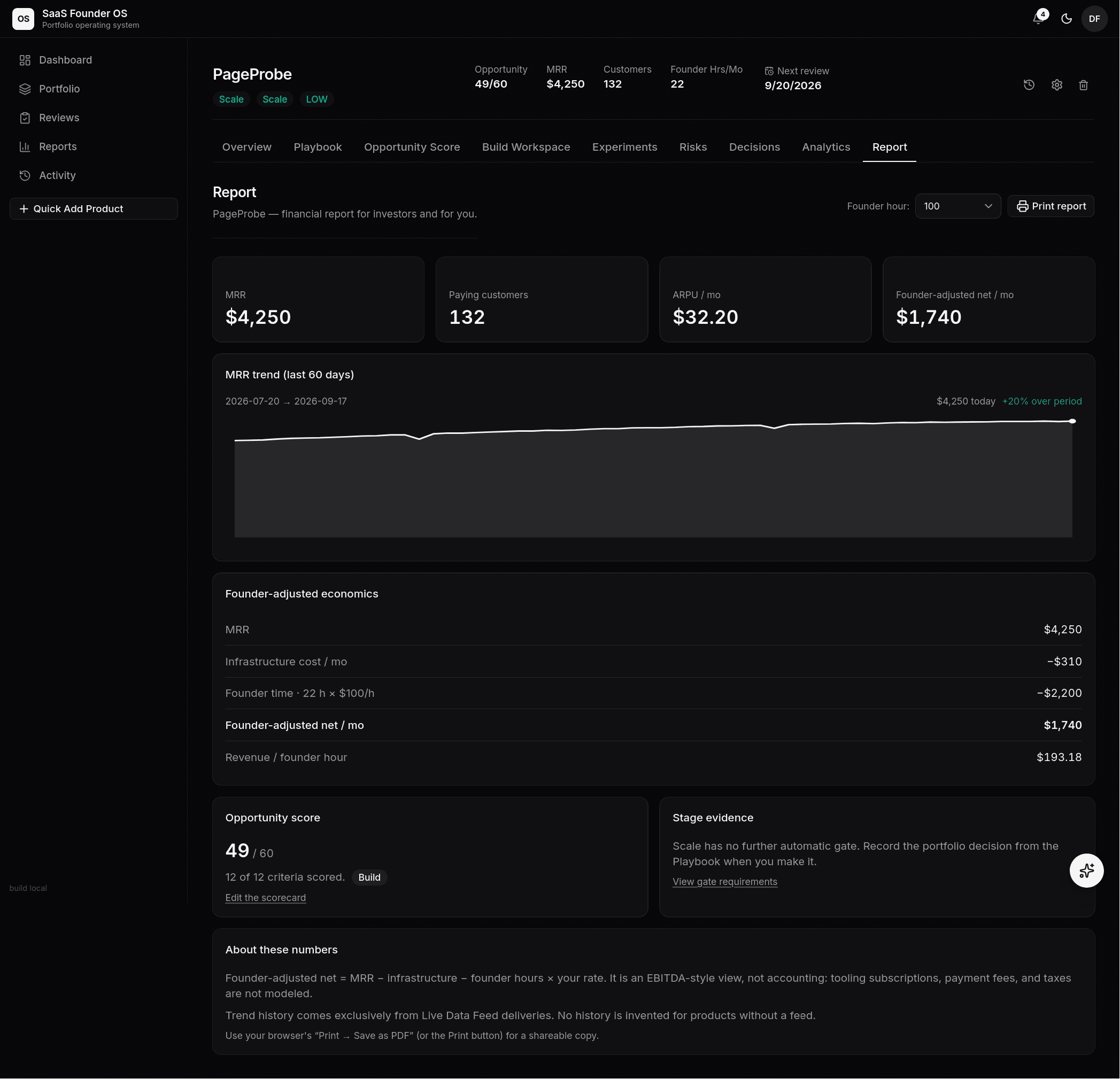 PageProbe's dossier: the one-page brief — KPIs, trend, the founder-adjusted
breakdown (including revenue per founder hour), score, gate status, then the
evidence: experiments, risks, decision history, and the connection stack —
ready to print or save as PDF.
PageProbe's dossier: the one-page brief — KPIs, trend, the founder-adjusted
breakdown (including revenue per founder hour), score, gate status, then the
evidence: experiments, risks, decision history, and the connection stack —
ready to print or save as PDF.
Report types & PDF export
Download PDF is the export: click it and pick the report type first — the picker is available on the live report pages and on every archived document's read view. For the archive, the type is an export lens: the snapshot always stores the full report, and the chosen type re-cuts the stored history to that type's sections (historical numbers, never regenerated). Documents we can't confidently section (free-form assistant answers) export whole rather than lose anything.
- Full report — everything: financials, opportunity score, gate, the complete playbook, experiments, risks, decision history, and the connection stack (product level), or totals, per-product economics, concentration, and sellability (portfolio level).
- Investor report — the investor document: economics, trend, opportunity score, gate, and the evidence behind them.
- Investor report — VC memo — the one-look memo: verdict, headline metrics, momentum, best evidence, and the next gate.
- Financials only — just the money: economics, per-product table, trend.
Every PDF is generated server-side with a cover page (title, generated date, founder-rate assumption, the honesty rules), running page numbers, and tables that break cleanly between rows — no browser chrome, no URLs in headers. Your brand, not ours: set your company name, tagline, and contact under Settings → Report branding and every PDF — live or from the archive — carries your name on the cover and in the page footers. Browser print was removed: the PDF is the artifact, and any PDF viewer prints it better than a print stylesheet could.
Saved reports
Anything worth keeping becomes a document, not a chat message:
- Save snapshot on a report page copies the full report (including each product's founder-hour rate and the generated date) into the archive as a markdown document.
- Save as report in the AI assistant keeps an answer you intend to act on — advice stops living in the dock's 20-message memory. Assistant answers are normalized into the same document shape as the report snapshots beside them (title header, generated date, scope), so they read and export to PDF cleanly. The assistant can also see your archive: ask it "what did my last saved report say — has anything changed?" and it will ground the answer in the actual documents (citing titles and saved dates, and flagging where the current numbers differ).
- The archive table on /reports lists everything, renders each document for reading and printing, and lets you rename or delete.
Financial reports are a Pro feature. The numbers are only as good as the data: connect Live Data Feeds and the reports read the real thing.
📷 Placeholder: the reports archive table (assistant answers and report snapshots side by side).