Your first hour
From empty portfolio to a working operating system in about fifteen minutes.
This page gets you from sign-up to a portfolio that actually tells you what to do next. It takes about fifteen minutes; the demo product is doing half the work.
1. Look at a finished product first
Every new account ships with ChurnPilot (Demo) — a fully worked example product: complete scorecard, filled playbook, experiments in every state, a risk register, and decision history. Open it and click through the tabs before you enter anything of your own. It shows you what "done" looks like, and it's badged DEMO so it never pollutes your numbers. Remove it whenever you like from its Settings → Danger zone.
2. Add your real products — all of them, finished or not
On the Portfolio page, Add Product opens a short wizard: pick a starting point (scratch or one of your templates), name it, set its stage. If the product already has revenue — you're adopting something you started before the OS — the next step is optional and yours: tick already has customers or revenue and enter where it stands today (MRR, customers, and optionally infra cost and founder hours). That becomes the product's baseline: the part of the numbers a live data feed can't see, and the charts start from your product's real beginning. The point is to get everything — the shipped one, the half-built one, the one you stopped thinking about in March — into the one you stopped thinking about in March — into one place. The portfolio is only honest if it's complete.
📷 Placeholder — see SHOT-LIST #28: the wizard's "already in flight?" step — MRR, customers, infra cost, and founder hours become the baseline.
Add Product goes one step further when you want scaffolding from day one: pick a starting point (scratch or a template), then tick the standard building blocks the product uses.
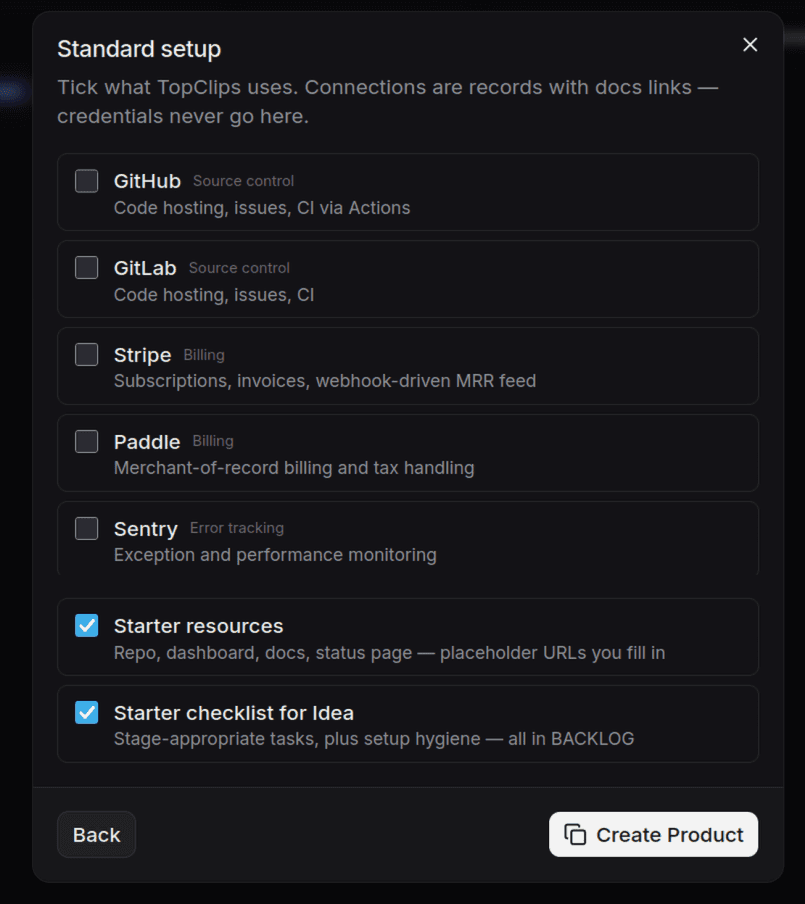 The wizard's standard-setup step: connections are records with docs links —
credentials never go here — and starter resources plus a stage-appropriate
checklist land in the Build Workspace.
The wizard's standard-setup step: connections are records with docs links —
credentials never go here — and starter resources plus a stage-appropriate
checklist land in the Build Workspace.
Setting the right stage matters more than anything else you enter today. Pick the stage the product has actually earned — not the one you hope it reaches. Stage Gates will hold you to the difference.
3. Score one product
Open a product and go to the Opportunity Score tab. Rate all twelve signals honestly — a 2 you admit beats a 4 you flatter. Then compare. The score is a ranking tool: which product can you prove cheapest and fastest?
4. Work the next actions
Each product's Overview ends with a prioritized list of 1–5 next actions, computed deterministically from stage, gate requirements, and playbook gaps. You never have to decide what to work on — only whether to do the work.
5. Book the first review
On the product's Overview, the header's next review metric is an inline date picker — set it now. The bell in the top bar will remind you when it's due — and when a stage gate becomes satisfiable, it will tell you that too.
What you have now
A scored, staged, honest portfolio with a queue of concrete next actions and a review clock running. That's the whole trick: the OS works if you let it make the small decisions for you, so your judgment is spent where it matters — whether the evidence is good enough to advance.
Next: the weekly rhythm — how this fits into real life.