Live Data Feeds
Pipe real revenue metrics from your billing system into the portfolio.
Live Data Feeds connect your SaaS product's billing data to SaaS Founder
OS. Instead of hand-updating spreadsheets, your MRR, churn, and customer
counts flow in automatically and show up with a live · synced badge.
How it works
- In your product workspace, open Settings → Integrations and create a feed — you'll get a unique ingest URL with a per-feed secret (shown once; rotate it any time).
- Point your billing system at the ingest endpoint. Stripe feeds accept
standard Stripe webhook payloads (add your signing secret for signature
verification; price intervals like yearly plans are normalized to
monthly). Generic feeds speak a simple JSON envelope — a daily
mrr.snapshotfor authoritative totals,customer.created/subscription.createdas customers arrive, and a removal event for churn — which makes them drivable from any automation tool, not just Stripe. Every feed item ships copyable sample payloads for each event, so you can test the whole pipe in minutes. - Metrics land in
metrics_dailyand appear on your dashboard with freshness indicators. Pause a feed any time and resume it without re-provisioning — paused feeds simply refuse events.
📷 Placeholder — see SHOT-LIST #26: the Integrations settings with a feed item expanded — sample payloads with copy buttons, rotate, pause/resume.
Once the feed is live, the numbers show up where you make decisions — the product's Analytics tab, with per-event ingest history:
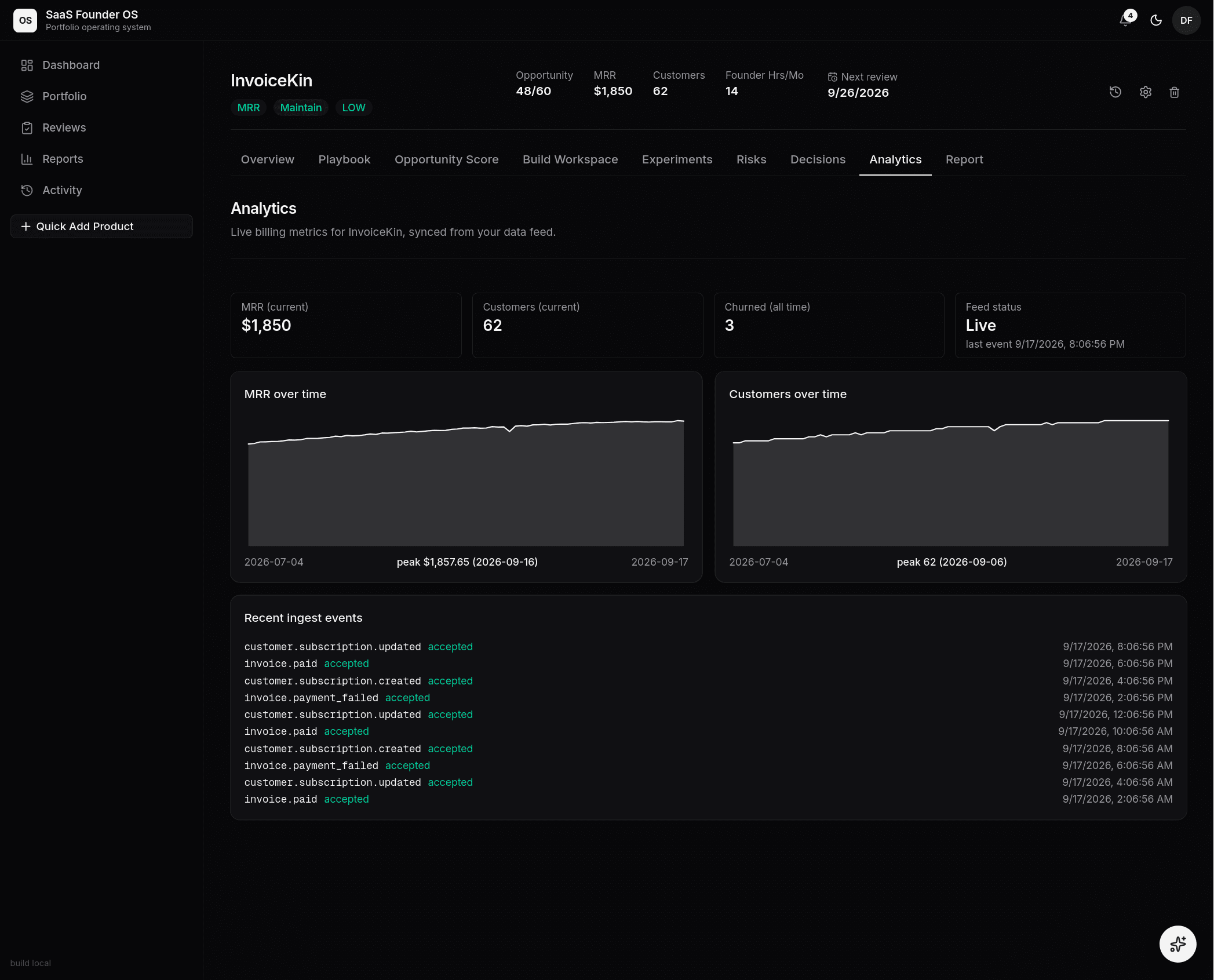 InvoiceKin's Analytics tab: feed status Live, MRR and customer charts
drawn from daily snapshots, and the recent ingest events — each Stripe event
accepted, with its type and timestamp.
InvoiceKin's Analytics tab: feed status Live, MRR and customer charts
drawn from daily snapshots, and the recent ingest events — each Stripe event
accepted, with its type and timestamp.
Security
- Each feed authenticates with its own rotating secret — compromise of one feed never exposes another.
- Payloads are validated against a generic JSON envelope schema; the Stripe adapter additionally verifies webhook signatures.
- Ingest is rate-limited to 30 events per minute per feed (with a global abuse backstop), and every event is recorded idempotently — replays and retries are safe.
Adopting a product you already started
A live feed owns what it can see. If your product had revenue before you connected the feed — customers the billing webhooks will never mention — enter that part in Basic Economics as the baseline ("MRR baseline, pre-feed"). The number you see everywhere is always:
total = baseline (what the feed can't see) + feed-tracked (what it does)
The economics form shows the decomposition while a feed is connected, and the baseline is editable at any time — fat-fingered it on day one? Correct it and every surface (header, Analytics, Report, dashboard) updates immediately, no webhook required. Churn is routed by ownership too: a churn the feed knew about comes off the feed's ledger; a churn of a pre-feed customer comes off your baseline.
📷 Placeholder — see SHOT-LIST #27: the economics form's baseline + feed decomposition on a feed-connected product.
The same rule draws the charts. Once the feed's first measurement lands, the days between when you added the product and that first measurement are drawn flat at your baseline and labeled hand-entered — so a 60-day trend starts at your product's real beginning, not the feed's first event, and you can always tell asserted history from measured history. Leave the baseline at zero and nothing is invented: the chart simply starts where measuring did.
📷 Placeholder — see SHOT-LIST #29: the Analytics trend with the flat hand-entered era before the feed's first measurement.
Why it matters
Portfolio decisions are only as good as the data behind them. When the MRR stage gate asks "is it making money?", a Live Data Feed answers with the real number — not a memory. And the absence of a feed is honest too: until one connects, the analytics page shows the real zero — no invented trend lines.
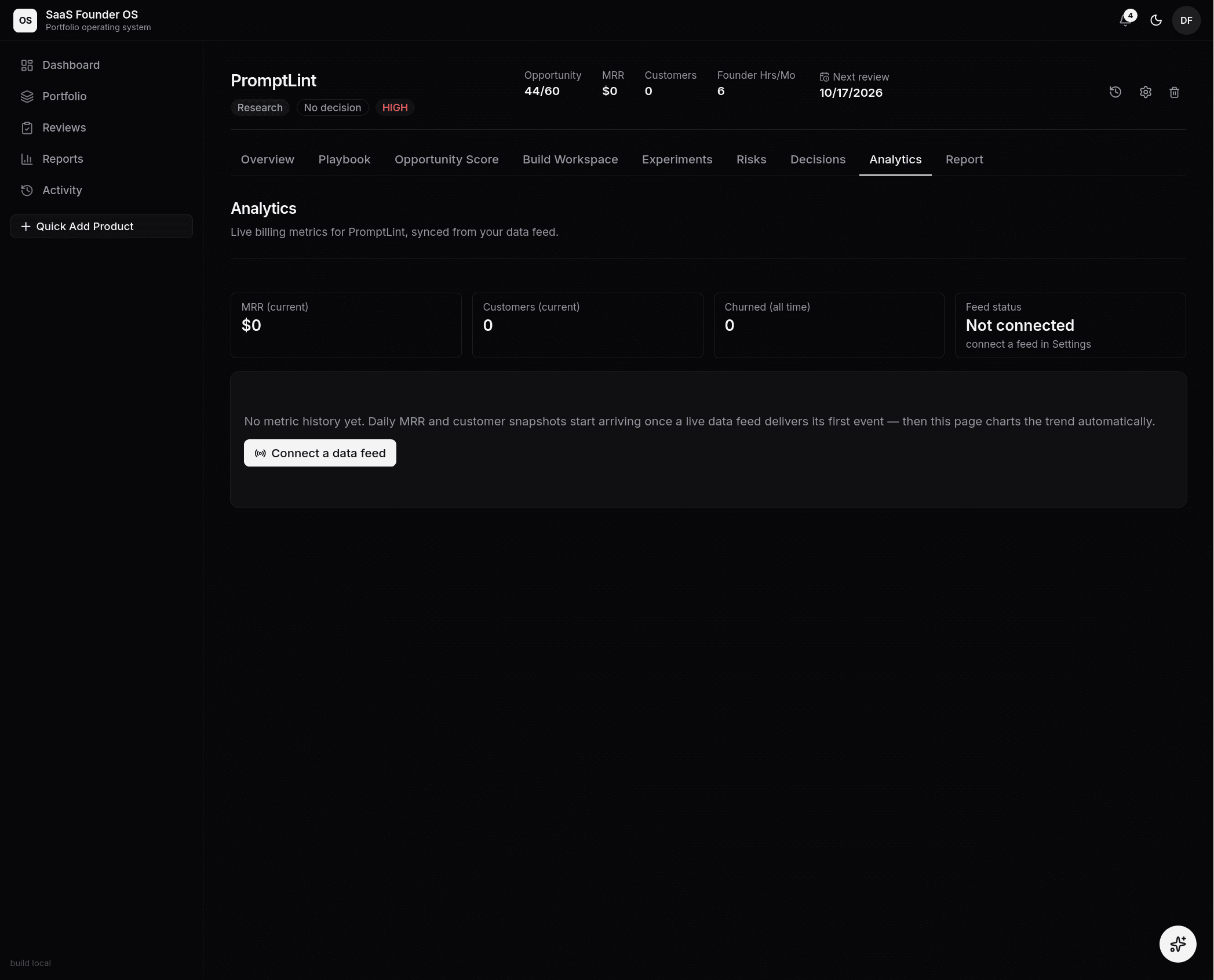 The honest zero: PromptLint has no feed connected, so the page shows $0 and
a single "Connect a data feed" action — instead of charts nobody measured.
The honest zero: PromptLint has no feed connected, so the page shows $0 and
a single "Connect a data feed" action — instead of charts nobody measured.